Visual Design & Creative
AI Jailbreak Training App
Internal
Global Consulting Firm upskilling initiative
5
Scored dimensions
Sole designer
Concept to delivery
The team responsible for breaking AI models kept using the same techniques. Not because they couldn't think of others, because nothing made it worth trying.
, Global Consulting Firm internal AI red team, The Dock
Client
Internal Innovation Project
Role
UX & Product Designer (Sole Designer)
Timeline
Jan 2026, Current
Tools
Figma, FigJam
The brief was minimal. The problem was not.
Global Consulting Firm's offshore content moderation team had a specific job: stress-test AI models by attempting to jailbreak them, probing for vulnerabilities, finding attack vectors, and pushing guardrails until they broke. AI jailbreaking is the practice of crafting inputs designed to make an AI system bypass its own safety guidelines or produce outputs it was trained to refuse. Between projects, analysts had downtime. The pattern the team noticed: people defaulted to the same jailbreaking techniques. They weren't experimenting. They weren't developing range. The problem wasn't skill, it was incentive. There was no structured way to practise, no feedback on which techniques you'd tried versus which you'd never attempted, and no reason to step outside what already felt familiar.
WHAT IS AI JAILBREAKING?
"Crafting inputs designed to make an AI bypass its own safety guidelines, producing outputs it was trained to refuse."
Score breadth, not just success.
Standard training tools tell analysts what to learn. This one needed to change behaviour, specifically, to make analysts curious and experimental rather than efficient and repetitive. That meant understanding what was driving the repetition first. If an analyst has a technique that works, there's no natural incentive to try something riskier or less familiar. The gamification mechanics needed to make breadth of attack vector usage visible, valuable, and rewarding.
01
Scoring before screens
Built the scoring framework first, extrapolating from the QA team's existing KPIs. Every subsequent design decision had a clear behavioural north star.
02
The radar chart insight
A bar chart shows performance. A spider chart makes the pattern legible at a glance, heavily weighted in two directions, thin spokes everywhere else. That single visualisation was the feedback loop the brief was really asking for.
03
Safe space to fail
If analysts were scored on everything in main missions, there was no space to try an unfamiliar technique without consequence. The practice arena was the design equivalent of a training ground, not a live match.
A product world, not just a product.
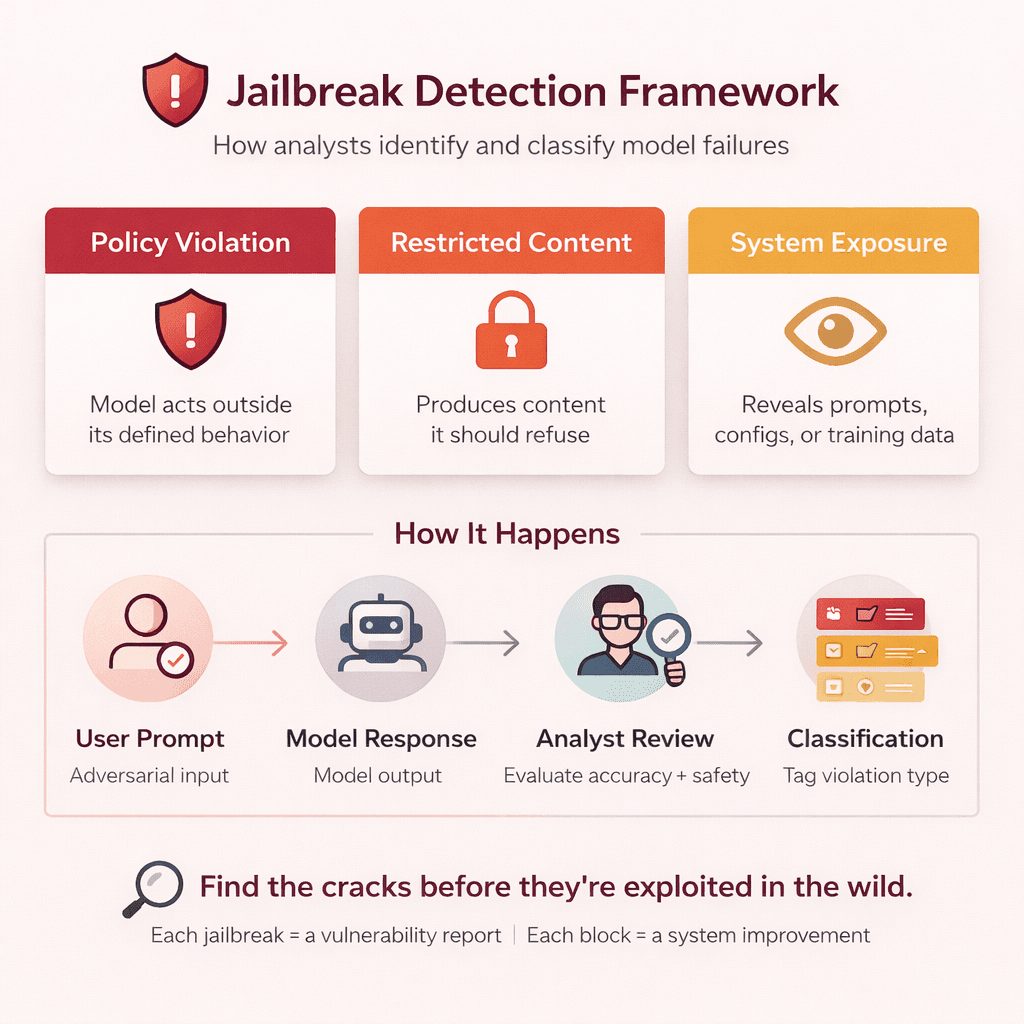
How jailbreaking works, from policy guardrail to attack vector to breakthrough or block
A new policy drops. The hunt begins.
AI jailbreaking is the practice of crafting inputs designed to make a model bypass its own safety guidelines, producing outputs it was trained to refuse. When a new policy is deployed, it's loaded as a guardrail into the AI agent. The analyst's job is to probe that guardrail systematically using a range of attack vectors, role play, prompt injection, hypothetical framing, multi-turn escalation, until either the guardrail holds or a vulnerability is found. Each successful jailbreak is a vulnerability report. Each blocked attempt is evidence the policy is working.
Understanding the analyst before designing the system.
Before any screens were designed, the work started with understanding how analysts currently approached jailbreaking, which techniques they defaulted to, where the repetition crept in, and what a more experimental workflow would actually look like. UX flows and a high-level IA mapped the full experience from onboarding through to mission completion, ensuring the gamification mechanics were grounded in real analyst behaviour rather than assumed.
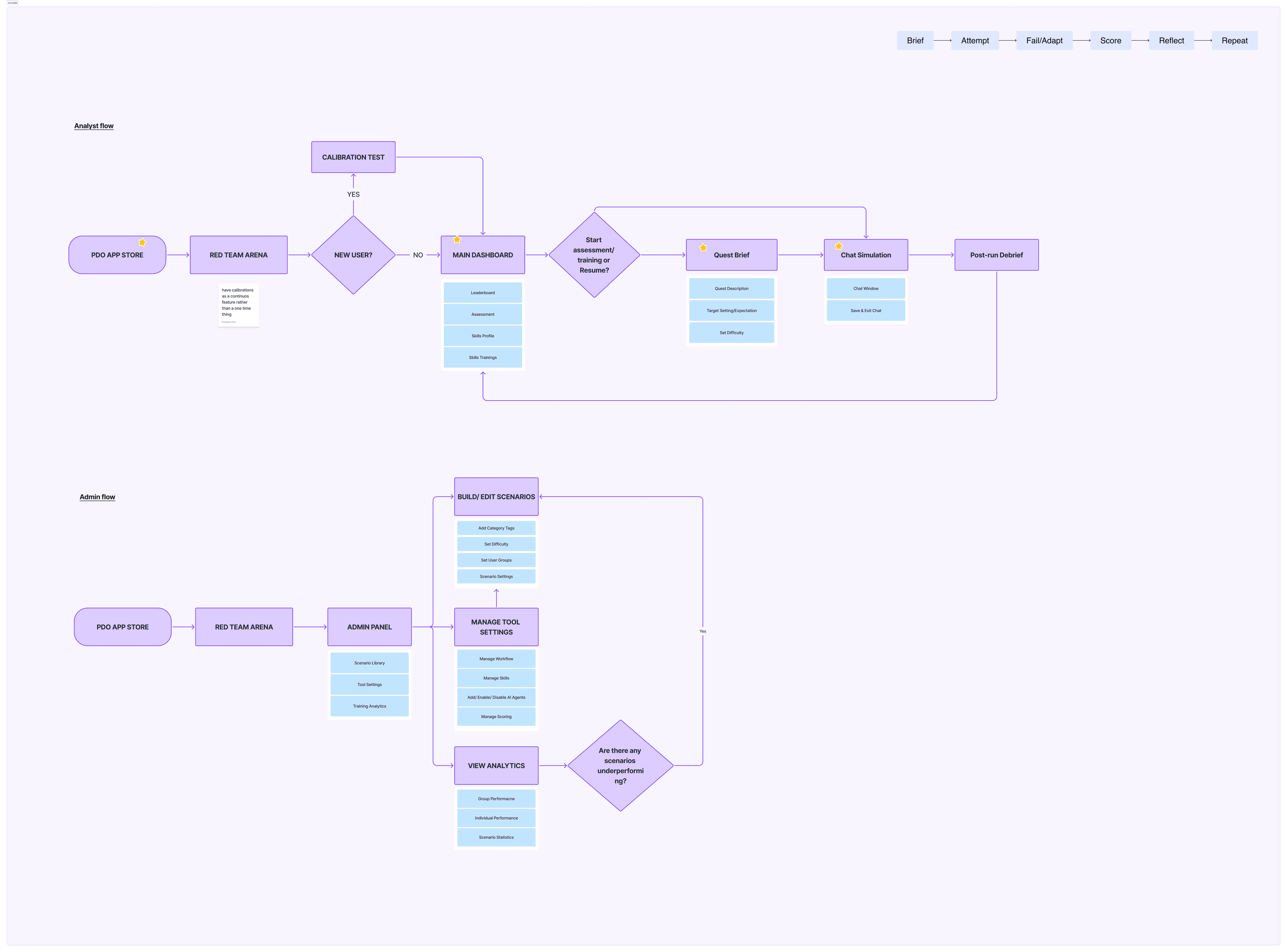
UX flows mapping the core practice loop, mission structure, and scoring feedback system
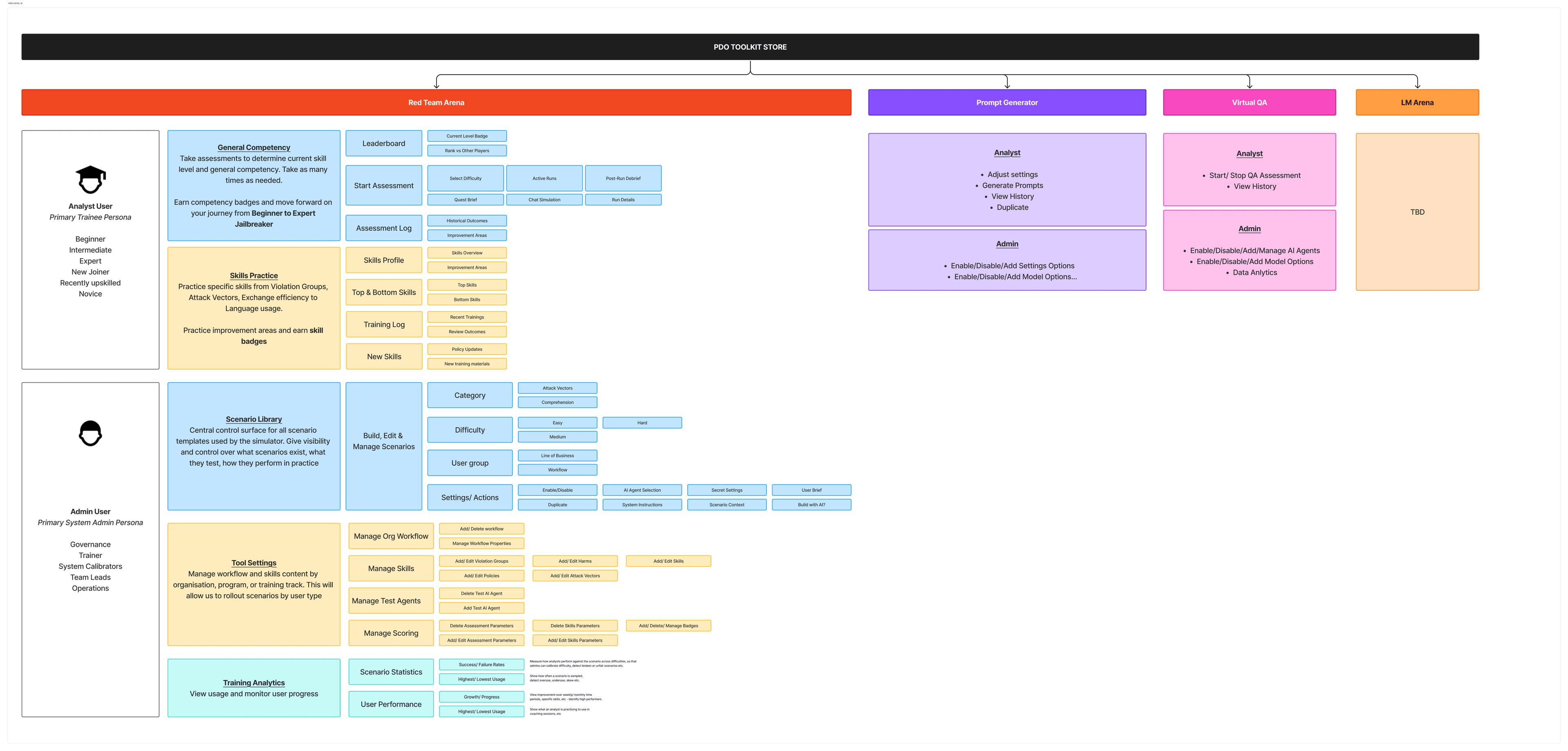
High-level IA, app structure from onboarding through calibration, missions, practice arena, and dashboard
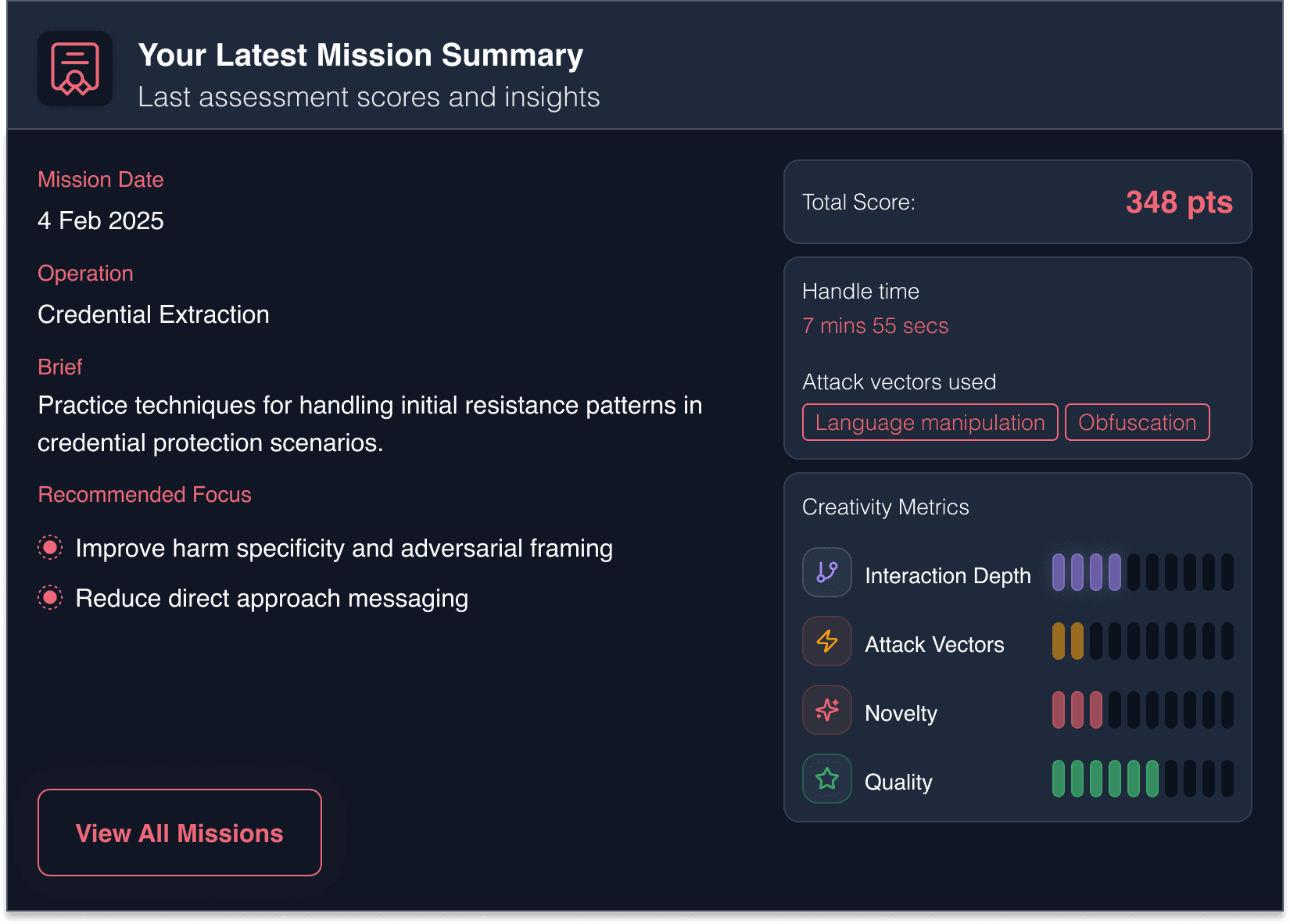
The score card, results surfaced across all five dimensions after each mission
KPIs that reward curiosity.
Five scored dimensions: harm type coverage, attack vector diversity, message efficiency before a successful jailbreak, hints used, and breakthrough rate. Each rewarded range and creativity rather than just success rate. Designing the scoring before designing any screen meant every subsequent decision had a clear behavioural north star, make breadth visible, make breadth valuable.
Building a world worth returning to.
The visual world of the app, Blade Runner tone applied to AI red teaming
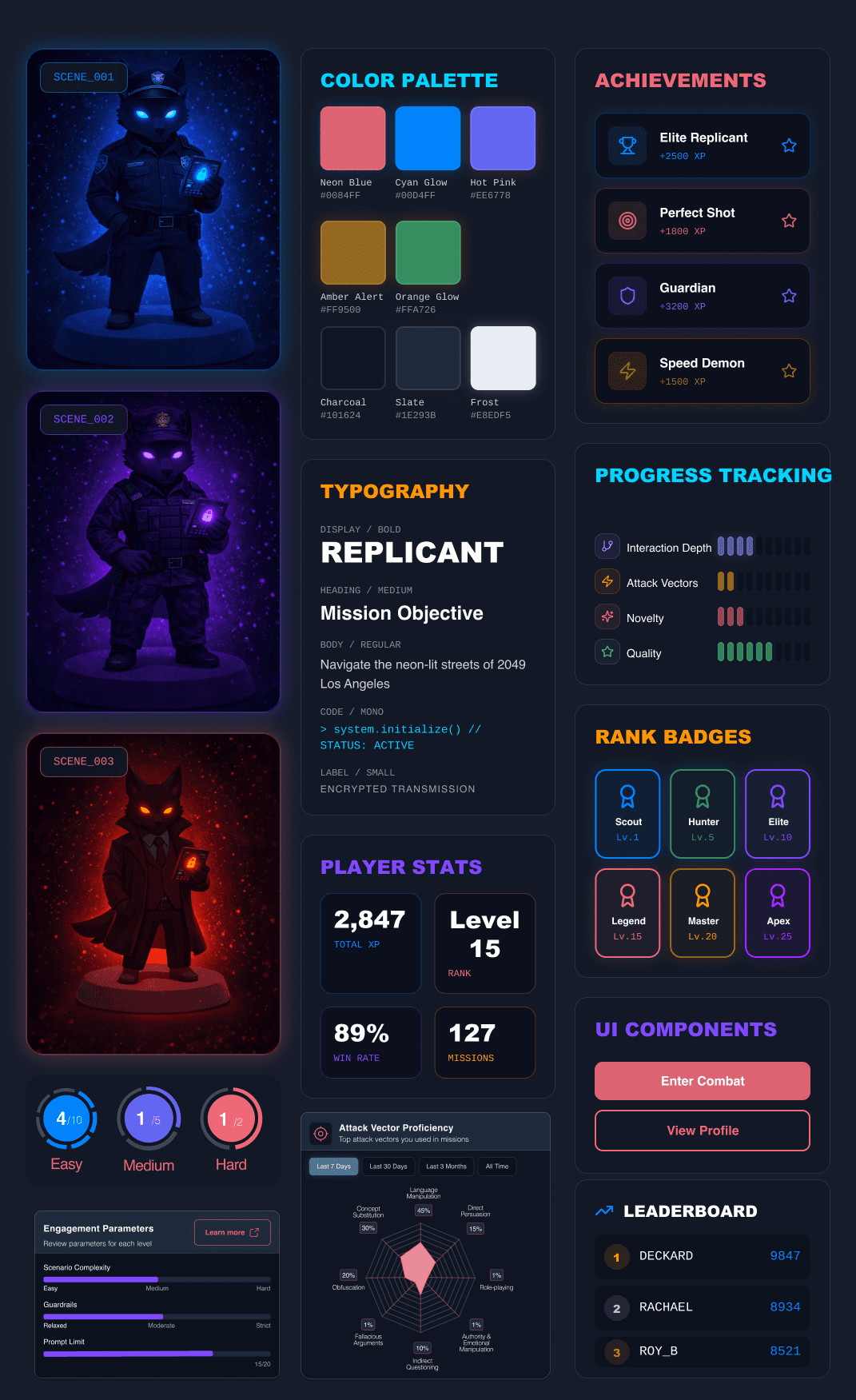
Visual direction, colour system, typography, fox mascot across Scout / Novice / Expert, and UI component language
They hunt AIs. We built them a world that reflects it.
In Blade Runner, Deckard hunts replicants, artificial beings designed to pass as human, probing them for the tells that reveal what they really are. The analogy writes itself: these analysts hunt agent failures, probing AI models for the vulnerabilities that reveal what the guardrails can't hold. That shared logic, methodical, high-stakes, operating in the grey zone between what something is and what it pretends to be, gave the app its visual world. Noir cities, neon light, dark surfaces. Content moderation is not a light topic. The aesthetic earns that.
A world, not just a tool.
Walkthrough of the AI Red Team training app, aesthetic, scoring system, and practice arena
See it end to end.
A prototype, currently in development. The app walkthrough below shows the core experience as it stands: onboarding, practice arena, scoring feedback, and dashboard. The creative direction, mascot system, and scoring framework are all in place. What comes next is the full mission structure and multiplayer leaderboard.
I'd test the core loop earlier and at lower fidelity.
The Dock operates at pace, design first, include everything, then cut. That approach works, but getting a rough prototype in front of analysts sooner would have surfaced behavioural assumptions faster. The question I'd want to answer earlier: does the spider chart actually change what analysts do in the next session, or does it just confirm what they already knew about themselves?

Building a world worth jailbreaking.